Edit Poshmark photos onto a white or plain background
Give your Poshmark main photo a clean white or plain backdrop, and keep the condition easy to judge. The item is cut from the photo you took; White background uses no generative AI.
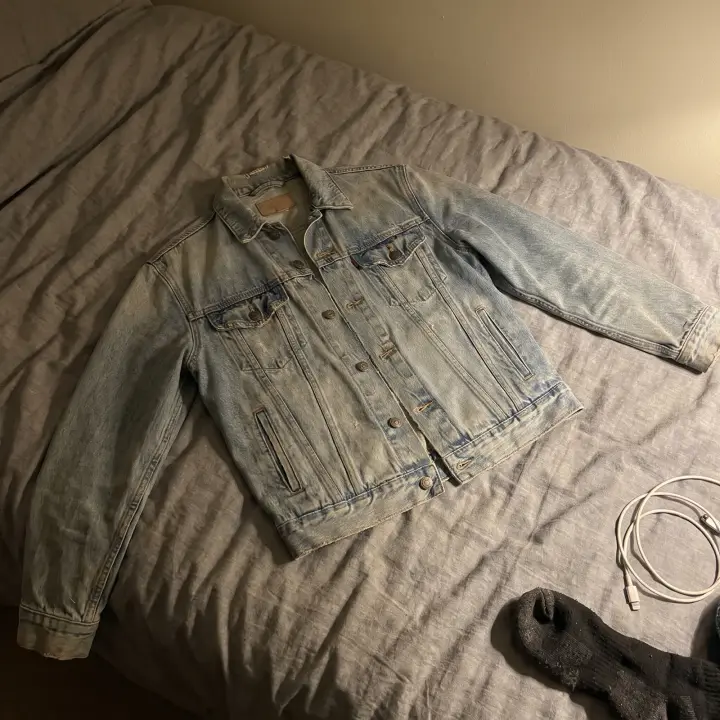 Before
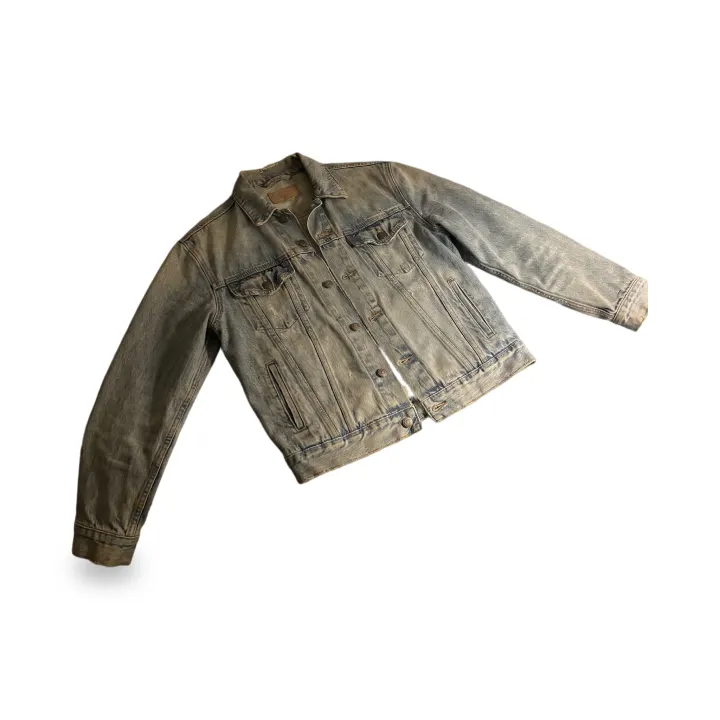 After
Photos (1–4)
Works best with one product per photo. Anything touching the product stays in the picture.
Background
Pure white (#FFFFFF), soft contact shadow, in seconds. Check the edges before downloading.
Aspect ratio
Free account · your photo stays on this page while you sign in with Google
No Google account? Sign in with email
Your edited photo appears here
Add product photos and press the button below. White backgrounds take seconds.
Can I edit my Poshmark photos?
Poshmark's Seller Policy asks for your original photos and says: "The item for sale should be clearly represented in the main photo. Avoid any photo editing techniques that may make it difficult for Buyers to accurately assess the condition of the item, such as collages or heavy special effects." Whether a new background passes that test is your call. The policy names collages and heavy special effects; a plain background is neither, but New scene redraws a thin outline of the item, so compare the result with the item and keep condition and flaw photos unedited.
Quoted from the source
Poshmark's Seller Policy on photos
Under Listing Descriptions and Pricing, the Seller Policy says:
- “Sellers are responsible for describing items truthfully, accurately, and completely.”
- “This includes creating informative listing descriptions that include your original photos of the items and details such as the condition and any flaws or unique features …”
- “The item for sale should be clearly represented in the main photo. Avoid any photo editing techniques that may make it difficult for Buyers to accurately assess the condition of the item, such as collages or heavy special effects.”
- “Please note that images as well as descriptions provided in comments and during Posh Shows (where applicable) may be reviewed and considered by Poshmark staff in the event of a dispute.”
Poshmark's listing guide adds:
- “The maximum number of photos you can upload is 16.”
Know before you list
Before you list on Poshmark
Smart List AI reads your photos
Poshmark's Smart List AI drafts a listing from your photos. Its guide says: "To improve the accuracy of Smart List AI, we recommend taking clear, well-lit photos of the entire item against a contrasting background, as well as a clear picture of the tag." For a white or cream item, pure white is not a contrasting background; try the Plain grey backdrop or another plain preset under New scene, and review what Smart List AI fills in.
Buyers return with photos
Under Posh Protect, buyers who find undisclosed damage or an item not as described have 72 hours after delivery to open a return case "with supporting photos". Show wear and flaws in your own photos so the listing already matches what arrives.
Keep your originals
Poshmark's Seller Policy says images and descriptions provided in comments and during Posh Shows may be reviewed by Poshmark staff in a dispute, and Posh Protect asks buyers for supporting photos. Keep the original of every photo you edit, so you can show what the item looked like when you shot it.
Luxury items: shoot the codes
Poshmark's luxury listing guide says: "We strongly advise photographing the serial or date code as it helps validate the authenticity of the item." Serial codes, labels and soles are detail shots; list them unedited.
16 photos, 4 per run
Poshmark's listing guide says: "The maximum number of photos you can upload is 16." HeyDreaming edits up to 4 per run, so do the main photo and a few angles. Poshmark Support's listing tip says: "Images should be sized to 1000 x 1000 pixels for optimal quality"; the Poshmark size page makes that square from your edited photo.
Poshmark listing photo sizeHonest listing photos
A cleaner background for your listing
The item comes from your photo
White background uses no generative AI: a cut-out model takes the item from your photo and puts it on pure white. With New scene the image model redraws a thin outline around the item, and see-through parts such as lace or mesh can be redrawn too, so compare before you list.
One look across your shop
White background gives every photo the same plain look. With New scene and 2–4 photos, each photo gets its own scene on the free plan. On Pro, Same scene for every photo puts them on one shared background when the photos were taken from the front; photos taken from above each get their own scene for now. If a shared scene can't be made, each photo gets its own.
5 free photos a day
Every account gets 5 free photo edits a day with no watermark. Pro raises it to 100 a day (up to 30 of them new scenes) when you list in bulk, and adds one ZIP download for a whole batch.
How it works
From floor photo to listing photo
01
Shoot the real item
One whole item per photo, in daylight, with some floor or wall around it. Condition close-ups, tags and serial codes don't need editing: list those as they are.
02
Pick a background
White background (fastest) or New scene with one of the plain presets. The prompt only describes the background.
03
Generate
Sign in with Google when you press Generate. White takes seconds; a new scene takes a few minutes.
04
Compare, then list
Check the result against your original. If anything about the item looks different, use the original photo instead. Make sure a buyer can still judge the condition from it.
Optional
Tell buyers what you edited
Paste this into your listing description if you like. It is not required by us; check Poshmark's own rules.
Keep exploring
Explore More
Common questions
Poshmark photo editing — FAQ
Does Poshmark allow edited photos?
Not without limits. The Seller Policy asks for your original photos and tells sellers to avoid editing that makes the condition hard to assess, naming collages and heavy special effects. A new background is an edit, so the choice and the risk are yours. Read Poshmark's current Seller Policy before you list. HeyDreaming is not affiliated with Vinted, Depop, eBay or Poshmark.
What exactly does the editor change?
It depends on the mode. The item is cut out of your photo and resized to fit the frame; small separate pieces (a loose belt, one earring of a pair) can be dropped. White background uses a cut-out model and no generative AI. With New scene the image model draws the background and also redraws a thin outline of the item; parts the cut-out sees as see-through (lace, mesh, fringe) count as background and can be redrawn. Anything touching the item, such as a hanger or a hand, stays in the picture.
Can Poshmark look at my photos in a dispute?
The Seller Policy says: "Please note that images as well as descriptions provided in comments and during Posh Shows (where applicable) may be reviewed and considered by Poshmark staff in the event of a dispute." Keep your original photos, and don't edit the ones that show condition or flaws.
Does a white background help Smart List AI?
Poshmark's guide asks for clear, well-lit photos of the entire item against a contrasting background, plus a clear picture of the tag. White contrasts with dark items; for white or pale items a plain grey or wood background contrasts more.
Can it remove wrinkles or put my clothes on a model?
No, and this page doesn't offer it. Removing wrinkles, adding a model or changing the item means an AI redraws the item, and the photo would no longer show what the buyer receives. Steam or iron the item and reshoot instead.
Clean up your next listing
5 free photos every day. White background uses no generative AI.
Edit a listing photoHeyDreaming is not affiliated with Vinted, Depop, eBay or Poshmark.
Poshmark pages quoted on this page, read : Poshmark Seller Policy (Version 3.9) · Poshmark Support: How to list · Poshmark: How to list an item · Poshmark: Posh Protect · Poshmark blog: Your Guide to Smart List AI · Poshmark: How to list a luxury item