Car Listing Photo Size and Export Checklist
Check dimensions, padding, file size and the downloaded photos before uploading a vehicle listing. Includes a reusable delivery checklist and dated source guidance.
By HeyDreaming

Written by HeyDreaming; published platform help checked Oct 31, 2026 (2026-10-31); internal QA is not a marketplace upload or buyer test; HeyDreaming does not publish listings or provide arbitrary-ratio presets.
Is there a universal car listing photo size?
There is no universal car listing photo size. Check your destination's upload rules and its actual thumbnail and full-size display before publishing. An accepted file can still look cropped in a listing card.
Always separate three distinct image properties:
- Pixel dimensions: Width and height (such as 1920×1440). Enough source detail matters; enlarging a small file cannot restore it.
- Aspect ratio: Width-to-height proportion (such as 4:3 or 16:9). A destination may crop or pad a photo to fit its display.
- File size (MB): File weight on disk. Uploaders reject files over their byte limits regardless of visual quality.
In HeyDreaming's AI car photo editor, 1920×1440 is our fixed 4:3 export option, not a marketplace mandate. Match target uploader requirements and verify actual screen display.
Comparing export formats and dimension choices
Choose export formats based on channel requirements and layout needs:
| Option | Format | Intended role | Canvas behavior & limits |
|---|---|---|---|
| Standard listing (4:3) | JPEG or PNG in a vehicle set | Consistent primary listing files | Fixed 1920×1440. Kept photos fit with padding when their aspect ratio differs. |
| Prepared original dimensions | Depends on the selected export | When the destination needs a different source size | Uses the prepared upload's canvas dimensions. Check the actual result; this does not mean untouched camera pixels. |
| Transparent cutout | PNG | A car layer for another layout | Empty pixels outside the estimated cutout; windows retain their original view. Check actual file size. |
| Camera original | RAW / JPEG | Archival master & condition proof | Preserved locally. More output pixels cannot restore absent source detail. |
HeyDreaming's upload preparation re-encodes to JPEG and limits the longest side to 3000 pixels. A kept photo resized for the primary set may have a separate prepared full-size copy under originals/; that copy can also include plate covers. Keep your untouched camera files separately. PNG export cannot restore detail lost earlier.
Published platform help, reviewed October 31, 2026
These are statements from public help pages checked on October 31, 2026. They are not a universal specification or a test of your account's uploader. No authenticated upload or marketplace draft was tested for this article.
| Channel | Source | Date | Published guidance | Remaining check |
|---|---|---|---|---|
| Autotrader (US) | Autotrader Resource | 2026-10-31 | This resource page states a maximum photo size of 10MB. No pixel minimum was confirmed here. | Check your account's upload screen and photo allowance. |
| Cars.com (US) | Cars.com FAQ | 2026-10-31 | Images must be under 8MB. No pixel dimensions verified on public seller FAQ. | Check actual dealer portal limits. |
| CLASSIC.COM | CLASSIC.COM Guide | 2026-10-31 | Recommends landscape, JPG/JPEG/PNG, minimum 2400×1600, max 10MB. | 1920×1440 is below both dimensions. Start with enough source detail and verify the actual export, or prepare it outside fixed-size mode. Original-size mode is not an acceptance guarantee. |
| Auto Trader (UK) | Auto Trader UK Help | 2026-10-31 | Recommends landscape and damage/interior views. Distinct UK entity; no pixel minimum or ratio asserted. | Inspect live preview in seller portal for unexpected thumbnail crop. |
For Facebook Marketplace or another destination, inspect the upload screen you actually use. This article does not prescribe a Facebook pixel size or a universal safe-zone percentage. Check the thumbnail and opened photo separately.
Local file acceptance audit: an internal four-frame test
In an internal QA audit on October 31, 2026 (2026-10-31), we inspected four exported JPEGs for one Ford Mustang Mach-E (QA-1031-MACHE_01.jpg to _04.jpg). We are re-inspecting saved local downloads now, not generating a fresh set or testing a live listing site:
- Frames 01–03: Three edited exterior photos, each 1920×1440.
- Frame 04: A retained cabin view, also 1920×1440. Its separate prepared full-size JPEG under
originals/is 2400×1800. Both are already 4:3; this cabin photo does not demonstrate aspect-ratio padding.
This test evaluated local export files only. It did not test a live listing site, buyer response, or condition-detail frames. Matching pixel dimensions does not prove silhouette accuracy or authentic color fidelity. Keep camera originals separate.
What padding can and cannot fix
A separate internal regression archive retained the Jeep photo below. Its prepared full-size copy is 2400×1677; the primary file fits it into 1920×1440 with padding. It is not part of the Mach-E set. The rear was already outside the source frame, and padding does not bring it back. This is a fit example, not an approved listing photo.
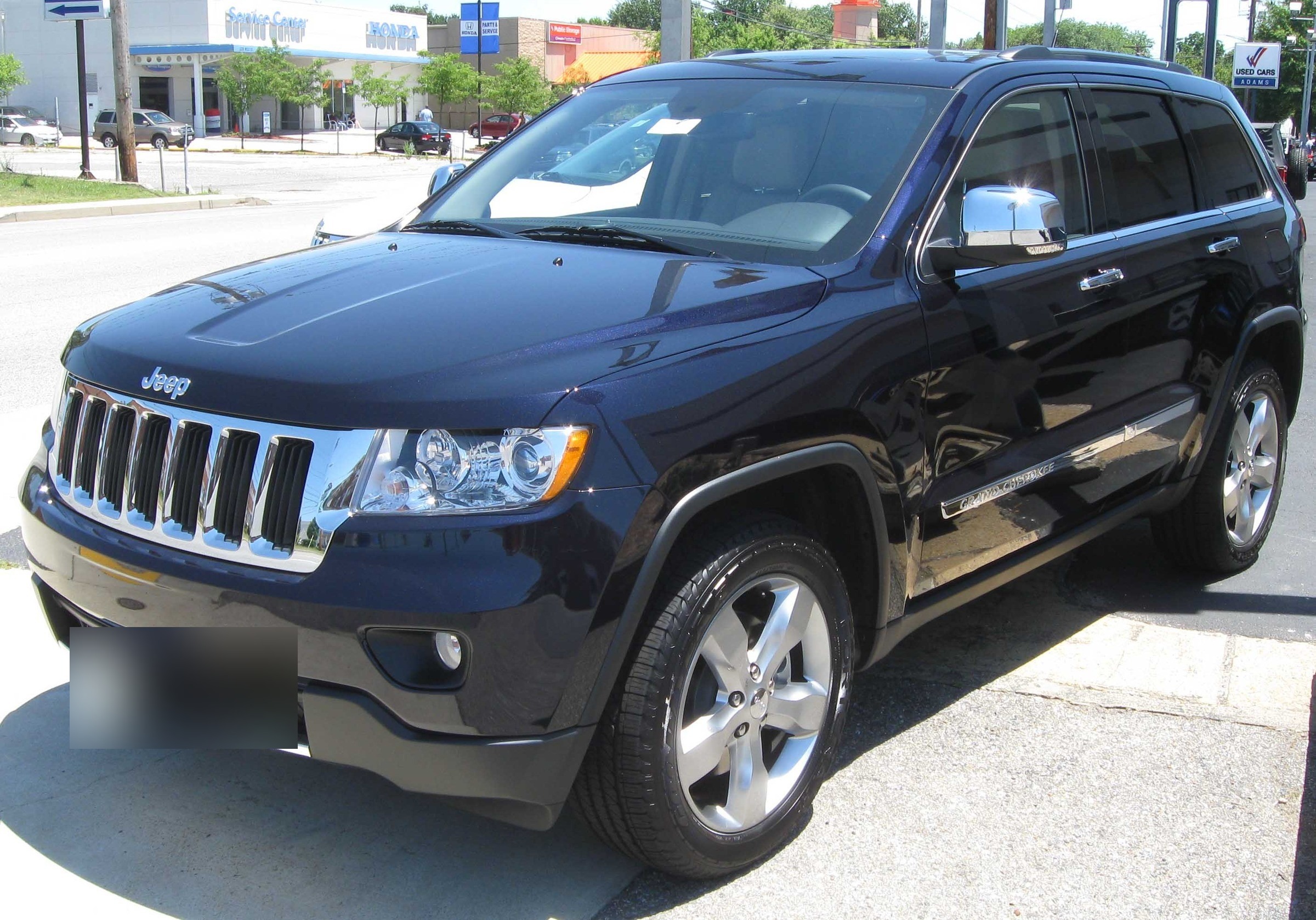
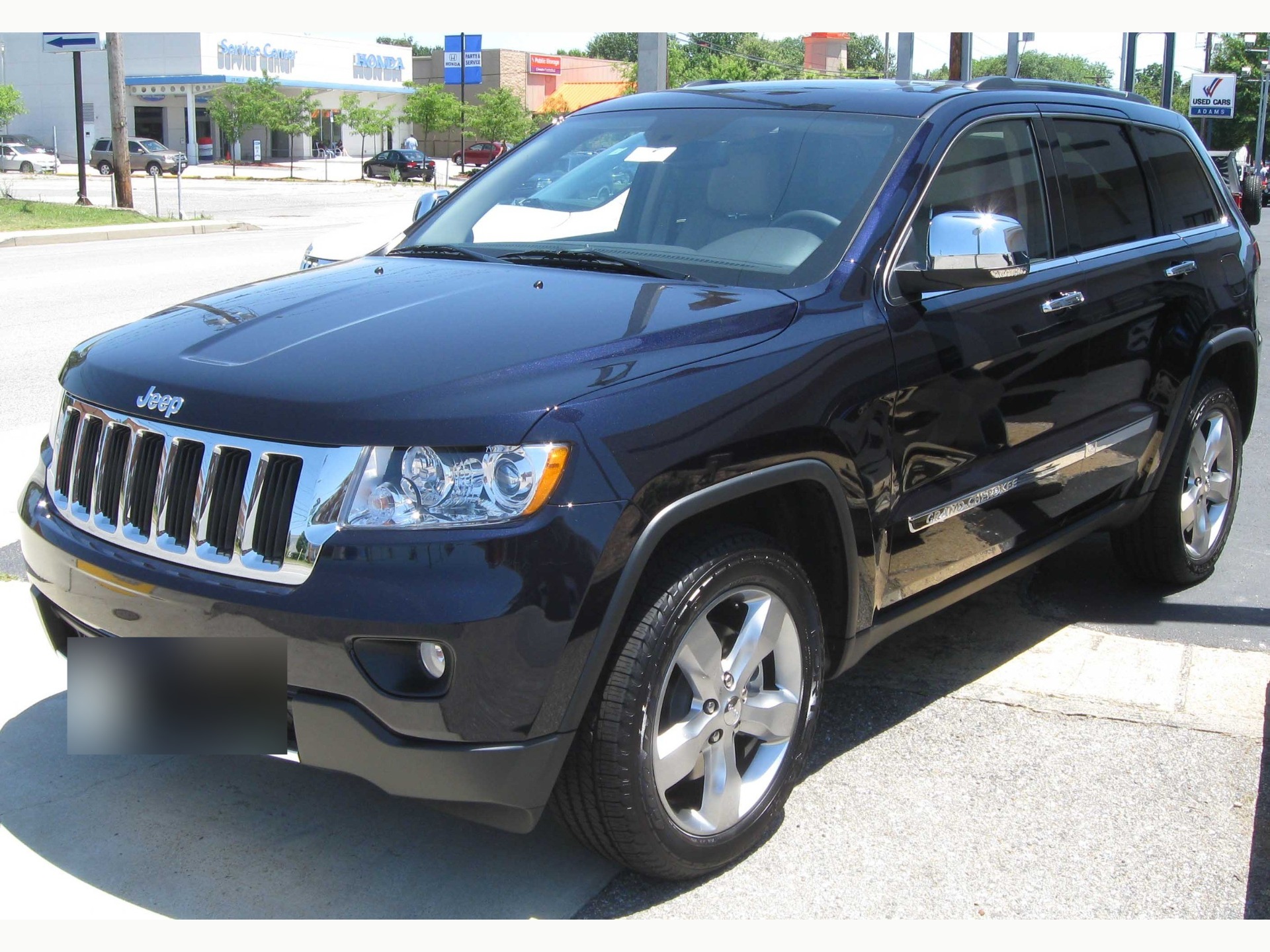
Photo: IFCAR, public domain, via Wikimedia Commons. Actual saved exports from our October 31 internal test; prepared/re-encoded and plate-blurred, with the second fitted and padded. Neither is the untouched camera file.

Prepare one stock-number set
Sign in to create a vehicle, upload up to 50 photos and review the results before exporting. Daily editing allowances apply.
Troubleshooting cropping, softness, and rejected uploads
| Issue | Possible cause | Check and next action |
|---|---|---|
| Thumbnail crop | The destination fits the photo to a differently shaped card. | Check the actual card and opened photo. HeyDreaming offers 4:3 or prepared original dimensions; another ratio needs an external tool or a different source framing. |
| Soft details | Source photo lacked sharpness or suffered digital zoom. | More output pixels cannot restore absent detail; no blur miracle exists. Reshoot with optical focus. |
| Upload rejected | The file exceeds the uploader's byte limit or another accepted-file condition. | Check actual format and final bytes against that uploader. For a finished studio background, JPEG may be smaller; check the new file too. |
| Edge flaws / plates | Complex reflections or unredacted plates slipped through review. | Inspect full-size exports. Verify plate covers and ensure window glass reflections remain natural. |
Public demonstration samples are available on our AI car photo editor page.
Pre-upload delivery checklist and manual verification
Before transferring vehicle photos to an inventory manager or marketplace, complete a manual quality audit.
Download the vehicle photo delivery checklist (CSV) to track your inspection.
How to use the delivery checklist
- Log vehicle metadata: Record stock number, destination rules URL, review date (
2026-10-31), and reviewer. - Record actual file properties: For each frame, note filename, format (JPEG/PNG), dimensions, and plate cover style.
- Verify review decisions: Mark each frame Pass, Fail, or N/A. Document failure reasons and operator review minutes.
- Inspect the destination preview: If your authorized account provides a private draft or preview, inspect the thumbnail and full-size photo there before publishing. Leave this worksheet check unresolved until you have seen the actual display.
This manual CSV worksheet does not import into the HeyDreaming workspace, rename files, reorder photos, or connect to a DMS. Never claim a platform draft has been verified without checking the live private preview.
Frequently asked questions
Is 1920×1440 universal for car listings?
No. It is HeyDreaming's fixed 4:3 option. CLASSIC.COM, for example, publishes a recommendation of at least 2400×1600. Check the destination's current guidance, your upload screen and the actual exported dimensions.
Should I use PNG or JPEG for a listing?
Use PNG when you need transparency or a lossless exported file. JPEG cannot keep transparency and can suit a finished background. PNG uses lossless compression, but neither format guarantees a particular file size. Inspect the actual file instead of relying on a promised MB range.
Why preserve original camera files?
Keep untouched camera files so you can return to the photographed scene, compare condition details or prepare another size. The prepared upload and any delivered full-size copy can already include resizing, re-encoding or plate covers; they do not replace your camera archive.
Related resources
- 12-Shot Car Photography Checklist: Capture complete listing angles across inventory.
- Batch Car Photo Editing for Dealer Listings: Manage stock-number batches, review decisions, and ZIP exports.
- Car Background Remover: Extract transparent vehicle cutouts for dealer promotions.
- AI Car Photo Editor: Standardize vehicle photos with studio backdrops and plate redaction.
Prepare one stock-number set
Sign in to create a vehicle, upload up to 50 photos and review the results before exporting. Daily editing allowances apply.
Keep exploring