A License Plate Cover and Branding Workflow with a Missed-Plate Check
Choose the plate tool or vehicle workflow, inspect the whole frame and add missed boxes. Includes a real background-plate miss and its saved-file recovery.
By HeyDreaming

Published by HeyDreaming, which supplies the tools described. Examples reuse dated internal QA on public-source images, not customer results. The worksheet is manual and does not add product functionality.
A license plate cover workflow should include tool selection, whole-frame inspection and a saved-file check. When photographing trade-ins or inventory parked on open staging lots, license plates often display personal registration details, state tags, or competing dealer frames. However, automated plate detection algorithms are not infallible. Dealership staff must understand when to use standalone plate masking versus automated vehicle background workflows, use a logo they own or have permission to use, and actively inspect every corner of the frame for missed background plates.
To explore plate styling options and whole-frame inspection checks, review our foundational guide on how to blur license plates in photos, along with our technical comparison on blur vs pixelate vs solid vs logo license plates.
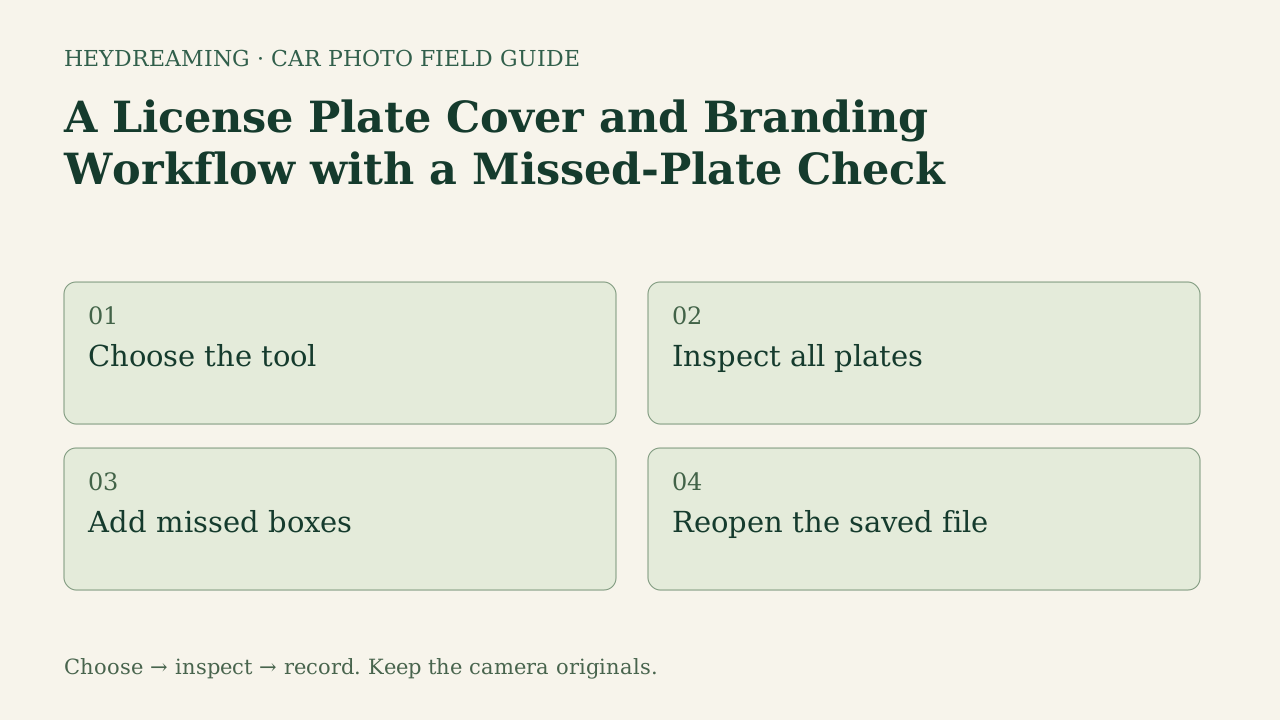
Open the full license plate cover workflow diagram (SVG)
Note: The diagram above is an explanatory workflow mapping plate masking and branding stages, not a measured statistical chart.
Route Selection: Standalone Plate Tool vs. Car Set Pipeline
A common source of confusion in vehicle image processing is assuming that full-vehicle editing workflows automatically handle custom dealer branding. In HeyDreaming, two distinct tool paths exist with different technical capabilities:
- Standalone plate tool: Runs locally in the user's browser, processing batches of up to 20 photos without requiring sign-in. This tool is free and does not debit daily automotive photo allowances. It offers five distinct styling choices: None, Blur, Pixelate, Solid color, and Your logo. Note that logo overlays render on an opaque white rectangular box rather than an angled perspective inlay.
- Automotive single editor and Vehicles batch mode: Designed for exterior background replacement, vehicle segmentation, and optional global corrections. Currently, self-serve vehicle workflows do not include custom logo selection or branded plate replacement.
Dealerships desiring branded dealer logos on license plates must route exterior photos through the standalone plate tool. Furthermore, use an owned or permitted logo and inspect its placement before publication.
The Missed-Plate Reality: Documented Mazda Case Study
The recorded test detected the main plate but missed a partial plate at the edge. This does not establish model training priorities, population failure rates or confidence thresholds. Dealership staff must never assume automated detection guarantees complete anonymity.
In an internal QA test recorded on October 31, 2026, HeyDreaming processed two public-domain photos—a white 2010 Acura RDX and a red 2011 Mazda3 sedan—through the standalone plate tool across all four active styles (Blur, Pixelate, Solid, and Logo), generating four ZIP archives containing eight exported JPEGs.
During this real test, an explicit detection failure occurred:
- The failure: While the primary front plate on the Mazda3 was correctly detected, a partial background vehicle plate visible at the far-right edge of the frame was completely missed by automated detection.
- The specific manual recovery: The tester reopened the identical two-photo batch in the browser tool, manually drew a second rectangular bounding box over the missed background plate, selected the Solid cover style, and exported a fifth ZIP archive containing two updated JPEGs (totaling five ZIP archives and ten JPEGs).
Inspect the detail crops below to observe the detection failure and subsequent manual recovery:
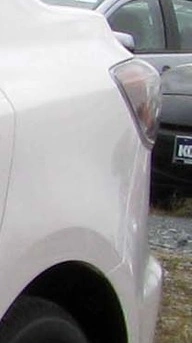
2011 Mazda3 sedan photographed by IFCAR (Public domain). Crop from standalone plate tool showing an automated detection failure on a background vehicle plate.

WebP previews are compressed versions of actual downloads. This detail crop illustrates an automated detection failure where a partial background vehicle plate at the edge of the frame was missed by automated detection.
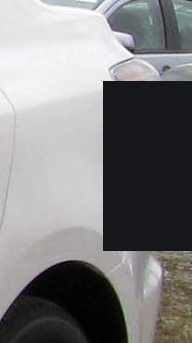
2011 Mazda3 sedan photographed by IFCAR (Public domain). Crop from standalone plate tool showing manual recovery with a second user-drawn solid box covering the missed background plate.
WebP previews are compressed versions of actual downloads. This detail crop illustrates the manual recovery process: drawing an additional bounding box to apply a solid cover over the missed background plate.
In both test photos, main plate characters were rendered unreadable within the selected detail crops. However, this observation does not constitute a blanket mathematical guarantee of absolute anonymity or foolproof detection across all lighting conditions.
Cover the plates before you post
Up to 20 photos, processed in your browser. Check every box and downloaded image. Free, no sign-up.
Four Essential Plate Inspection Regions
To catch missed plates before listing publication, reviewers should inspect four specific zones across every inventory frame:
| Plate Region | Inspection Focus | Observation / Scope | Required Reviewer Action |
|---|---|---|---|
| Main Primary Plate | Front or rear bumper center | Detected in the recorded examples; other inputs untested | Verify cover boundaries do not obscure grille trim |
| Opposite Plate (Angled) | Distant rear/front plate on 3/4 angle | Not separately benchmarked | Check for partial numbers visible past box edges |
| Partial Background Plate | Customer cars or service lot vehicles | One partial plate missed in this test | Manually draw second bounding box in plate tool |
| Suspected Text Regions | Trade-in temporary permits, lot tags | Not separately benchmarked | Manually box trade permits taped to rear windows |
Using the Plate Cover and Branding Worksheet
To ensure quality inspectors verify every plate region across a vehicle set, download our manual tracking template:
Download the license plate cover and branding workflow worksheet (CSV)
The template provides four structured rows matching our inspection zones: main plate, rear plate if present, partial background plate, and other suspected plate region. Reviewers log filename, plate_region, detected_box (Yes/No), manual_box (Yes/No), cover_style (Blur, Pixelate, Solid, or Logo), saved_file_checked, and notes.
This worksheet is a manual operational checklist. It does not connect automatically to camera hardware or dealer management systems. Quality staff manually inspect exported images, verify that secondary background plates were covered, check the logo’s box, content and margins, and sign off before syndication.
Technical Capabilities and Operating Limits
When executing a plate masking and branding workflow, keep documented platform boundaries in mind:
- Standalone tool is browser-local: Up to 20 photos can be processed per session without an account. While model weights and analytics require network access, no image upload was observed in the tested execution path. However, this does not represent a formal network security audit.
- Logo geometry: Uploaded dealer logos render centered on an opaque white rectangle. The tool does not perform perspective distortion, drop shadows, or surface curvature mapping to simulate a physical molded plastic plate frame.
- Re-encoding on export: Selecting the "None" style exports the image through the browser canvas, which still produces an encoded export; it is not an untouched original copy.
- Workflow independence: Standalone plate masking is independent of background replacement allowances; applying plate covers in the standalone tool did not use the automotive daily-edit allowance in the recorded path.
Frequently Asked Questions
Can dealership logos be applied automatically inside the Vehicles batch editor?
No. The Vehicles batch editor focuses on automated background replacement and global leveling. Custom logo branding is available exclusively within the standalone plate tool. Dealerships wanting branded inserts must route exterior images through the standalone plate tool.
Why do automated tools miss background license plates?
This test establishes the visible miss, not its internal cause. Small size, angle, occlusion and frame boundaries are useful inspection targets, but no threshold or causal analysis was measured. Inspect all regions and add a box where needed.
Does applying plate blur guarantee complete consumer privacy?
No. Inspect readable character strokes, cover margins and every other visible plate in the saved file. These tests did not evaluate reconstruction resistance or anonymity. A selected style alone is not a whole-scene privacy assessment.
Immediate Next Step
Open one owned image in the standalone plate tool, inspect background traffic and the main plate, add any missed boxes, then reopen the downloaded file. If you also need background replacement, the AI car photo editor is a separate step; review covers again after the final export.
Cover the plates before you post
Up to 20 photos, processed in your browser. Check every box and downloaded image. Free, no sign-up.
Keep exploring