A Car Photo Revision Log That Stops Repeating the Same Request
Track each frame, defect cause, requested revision and final decision. Separate capture, cutout, specification and approval problems in a reusable CSV log.
By HeyDreaming
Published by HeyDreaming, which supplies the tools described. Examples reuse dated internal QA on public-source images, not customer results. The worksheet is manual and does not add product functionality.
A useful car photo revision log makes a request specific: identify the stock, frame, observed problem, allowed change and next reviewer. A message such as “fix the background” leaves those decisions open. The worksheet below is a manual way to record them; no reduction in staff time or repeat requests was measured.
While our foundational guide on batch car photo editing outlines stock-number vehicle sets and their file handoff, this guide establishes a frame-level defect logging protocol across four distinct rework categories: capture errors, cutout mask flaws, export specification mismatches, and approval miscommunications.
The Revision Logging Workflow
Resolving photo defects efficiently requires an orderly four-stage review:
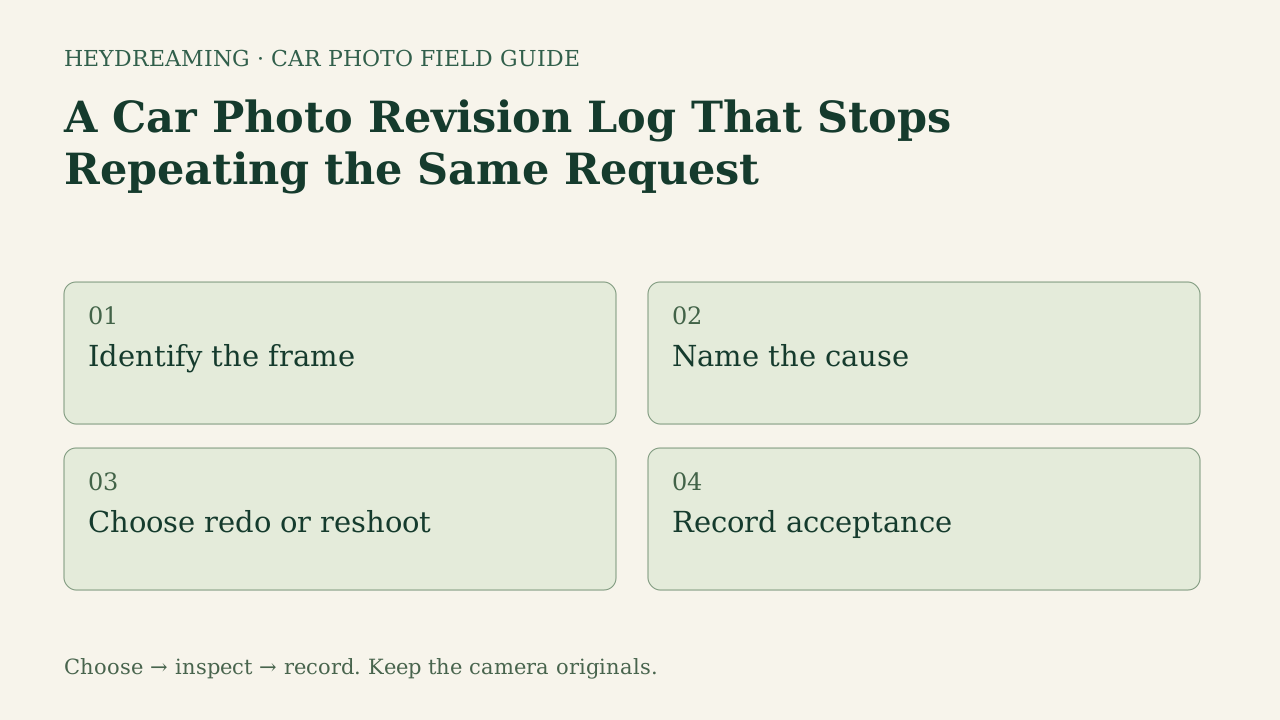
This diagram illustrates an explanatory review workflow, not a measured performance benchmark:
- Identify the frame: Pinpoint the exact vehicle stock number and image frame requiring adjustment.
- Name the cause: Classify the issue as a capture defect, cutout mask error, specification mismatch, or communication conflict.
- Choose redo or reshoot: Determine whether the problem requires digital software re-processing or physical camera re-capture on the lot.
- Record acceptance: Document final sign-off once the corrected image passes inspection.
Four Root Causes of Photo Revisions
To prevent repeated feedback cycles, categorize every revision request under one of four root causes:
1. Capture Defects (Physical Lot Issue)
Some capture defects mean the required evidence was never recorded; processing cannot faithfully reconstruct that missing evidence in this flow.
- Examples include vehicles parked on grass that hides lower tires, excessive lens flare, or unwashed panels.
- Action: Recapture the required view with the vehicle unobscured. Retaining the source preserves what was photographed but does not recover missing evidence. Some captured color casts or roll may be candidates for optional corrections, with review.
2. Cutout Mask Flaws (Software Boundary Error)
Automated silhouette extraction can occasionally clip thin vehicle structures.
- Examples include antenna masts cut off against bright skies, clipped roof racks, or jagged wheel arches.
- Action: Inspect the source and record whether a different available action could help; repeating a background choice is not mask editing. Note that in HeyDreaming's Vehicles workflow, frames allow at most two redos, and an undo can require an additional redo. A contact shadow does not guarantee an accurate cutout mask.
3. Specification Mismatches (Downstream Feed Requirements)
Errors caused by incorrect export parameters or channel formatting.
- Examples include a saved file that differs from the size agreed for this set, or a selected plate cover missing from the actual export. The fixed 1920×1440 option is 4:3, not a universal marketplace requirement.
- Action: Check the agreed mode against the saved file: fixed 1920×1440 or prepared original dimensions. Another aspect ratio needs external handling or a different source; verify destination guidance and preview.
4. Approval or Communication Conflicts (Subjective Manager Rejections)
Misaligned expectations between lot staff and approving managers.
- Examples include rejecting an approved preset tone after a whole batch was already processed.
- Action: Standardizing preset registers before processing. For team workflow alignment, review our guide on car photo editing workflow, and evaluate multi-rooftop standards in multi-location car photo audit.
Prepare one stock-number set
Sign in to create a vehicle, upload up to 50 photos and review the results before exporting. Daily editing allowances apply.
Real Defect Evidence: Missed Plate Identification
Documenting exact defects clarifies what staff must communicate. In internal QA testing on a public-domain 2011 Mazda3 sedan, we tested HeyDreaming's standalone plate masking tool.
The figures below show a real defect where an automated pass missed a secondary background plate, followed by a manual revision:
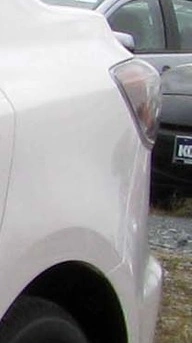
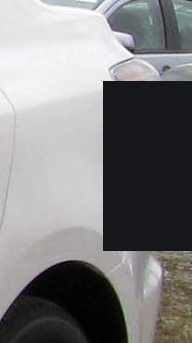
Photo credit: IFCAR, Public domain, via Wikimedia Commons. Modifications: source image re-encoded, processed in HeyDreaming standalone plate tool, manual bounding box added on second pass, exported to JPEG, and compressed to WebP for web delivery.
Why this defect illustrates logging requirements:
- Exact Frame Identification: An illustrative entry could use your source filename and angle, with “partial background plate at the far-right edge still visible.” The downloadable template is blank apart from category labels; it is not a filled customer log.
- Explicit Instruction: Instead of requesting "fix plates," write “add a second box over the partial background plate, inspect margins, then open the saved file.” Leave resolution blank until that check is complete.
- Prohibited Alterations: Record the permitted changes and prohibit hiding documented vehicle condition. This standalone plate-box repair did not consume a car-edit daily allowance; human staff minutes were not measured. Software must never blur body scratches or bumper scuffs under the guise of background or plate editing.
Defect Classification and Action Matrix
| Category | Typical Defect | Resolution Route | Prohibited Action |
|---|---|---|---|
| Capture | Grass concealing tire rubber | Physical lot reshoot on flat asphalt | Do not paint fake tire edges |
| Cutout | Antenna clipped against sky | Inspect the source; keep original or recapture if needed. A different preset does not repair a mask | Do not paint or blur the missing boundary |
| Specification | Saved file differs from agreed dimensions | Check selected mode and destination; external handling if another ratio is required | Do not stretch the vehicle |
| Approval | Disputed background preset | Check preset register agreement | Do not alter interior/condition shots |
Downloadable Car Photo Revision Log
To eliminate repeat requests across your store, track photo defects with our downloadable CSV template:
Download the car photo revision log (CSV)
Use this manual spreadsheet to log rework across four standard categories: capture, cutout, specification, and approval or communication. Staff record vehicle stock numbers, exact frame identifiers, observed problems, requested changes, explicit confirmation that condition changes are prohibited, staff owners, next actions, and final resolutions. The worksheet is a manual coordination aid that does not connect to DMS software or enforce application behavior.
Frequently Asked Questions
Why must revision logs explicitly prohibit vehicle condition changes?
When managers request re-edits to clean up photos, editors might inadvertently airbrush out paint scratches, door dings, or wheel curb rash. Buyers rely on photographs for transparent condition assessment. Explicitly prohibiting condition alterations protects dealership integrity.
What should staff do when a software cutout repeatedly clips an antenna?
Inspect the source before spending more reruns. Switching preset tone can expose or hide the problem, but it is not a manual mask repair. If the required outline still fails, keep the camera view or recapture it. Vehicles redo limits apply to available actions; do not assume repeated attempts will create missing evidence.
Does maintaining a revision log guarantee staff labor savings?
This worksheet and internal example did not measure labor savings. The log makes a request, owner and acceptance decision reviewable; it does not enforce app behavior, guarantee fewer revisions or certify condition compliance.
Immediate Next Action
Take one owned exterior photo that previously required rework and log its defect category and resolution in the revision log before processing new inventory batches in HeyDreaming's AI car photo editor.
Prepare one stock-number set
Sign in to create a vehicle, upload up to 50 photos and review the results before exporting. Daily editing allowances apply.
Keep exploring